This section describes on how to install Xdebug.
How you install Xdebug depends on your system. There are the following possibilities:
You can also install Xdebug with the following legacy installation methods:
Installing on Linux #
Installing Xdebug with a package manager is often the fastest way. Depending on your distribution, run the following command:
- Alpinelinux:
sudo apk add php7-pecl-xdebug, or
sudo apk add php8-pecl-xdebug
- Arch Linux:
sudo pacman -S xdebug
- CentOS:
sudo yum install php-xdebug
- CentOS (Remi Repo):
sudo yum install php74-php-xdebug3, or
sudo yum install php80-php-xdebug3, or
sudo yum install php81-php-xdebug3
- Debian (9/stretch, testing/buster/bullseye/sid):
sudo apt-get install php-xdebug
- Fedora:
sudo dnf install php-xdebug
- Gentoo:
emerge dev-php/xdebug
- Manjaro (20.1/Mikah):
sudo pacman -S xdebug
- RHEL:
sudo yum install php-xdebug
- RHEL (Remi Repo):
sudo yum install php74-php-xdebug3
- SUSE (openSUSE, Enterprise):
sudo zypper in php7-xdebug, or
sudo zypper in php8-xdebug
- Ubuntu (18.04 LTS/Bionic, 20.04 LTS/Focal):
sudo apt-get install php-xdebug
- Ubuntu (Ondřej Surý's PPA):
sudo apt-get install php7.4-xdebug, or
sudo apt-get install php8.0-xdebug, or
sudo apt-get install php8.1-xdebug
Xdebug's latest version is 3.5.3.
For packages that have the PHP version in the package name, such as in
php81-php-xdebug3, you can substitute the PHP
version with the one that matches the PHP version that you are running.
Linux distributions might be providing an old and/or outdated version.
If the package manager
installs a version that is no longer supported (see Supported Versions), please install
Xdebug with PIE, or from source
instead.
Installing with PIE #
PIE is an
installer for PHP extensions on Linux, macOS, and Windows. It builds on top of
the Packagist
ecosystem, and the installer tool is modelled on Composer.
- Linux
-
Install PIE,
but also the required packages for building PHP extensions from source.
- macOS
Install PIE via homebrew with brew install pie.
This will also install the required packages for compiling and installing
Xdebug from source.
- Windows
You only have to install
PIE because it will download the pre-built Xdebug extension DLLs.
When PIE is available, you can install Xdebug with:
pie install xdebug/xdebug
If you are running macOS, Linux, or any Unix-like operating system, then PIE
will first download the source code of the extension. Then it will configure,
compile, and install the extension into the right directory.
On Windows, PIE will download the pre-built binaries from a GIT release.
In either situation, PIE will also attempt to enable Xdebug by creating an INI
file (such as 90-xdebug.ini), or adding the correct line to
php.ini.
After PIE has installed Xdebug, you can start using its
features.
Installing with PECL #
The PECL installation tool and PECL web site are deprecated. PIE (PHP Installer
for Extensions) is the replacement for PECL. You can find the instructions for
installing Xdebug with PIE above.
You can install Xdebug through PECL on Linux and on macOS with Homebrew available.
Prerequisites:
- macOS:
- Xcode's command line tools (run:
xcode-select
		--install
).
- PHP installed through Homebrew.
- Linux:
- GCC and associated libraries.
- PHP development headers (see Compile below).
Run:
pecl install xdebug
You should ignore any prompts to add
"extension=xdebug.so" to
php.ini — this will cause problems.
In some cases pecl will change the php.ini file to
add a configuration line to load Xdebug. You can check whether it did by
running php -v. If Xdebug shows up with a version number, than
you're all set and you can configure Xdebug's other functions, such as
Step Debugging, or Profiling.
If it is there, you can skip to the What's Next?
section.
If pecl did not add the right line, skip to the Configure PHP section.
Issues on macOS #
On Apple M1 hardware, programs can either be compiled for the native M1/ARM64
architecture, or for the emulated x86_64 architecure. Sometimes there is a
mismatch with the default and PECL will fail, or Xdebug won't load with a
message such as:
PHP Warning:  Failed loading Zend extension 'xdebug.so' (tried: /opt/homebrew/lib/php/pecl/20190902/xdebug.so (dlopen(/opt/homebrew/lib/php/pecl/20190902/xdebug.so, 9): no suitable image found.  Did find:
        /opt/homebrew/lib/php/pecl/20190902/xdebug.so: mach-o, but wrong architecture
        /opt/homebrew/lib/php/pecl/20190902/xdebug.so: stat() failed with errno=22), /opt/homebrew/lib/php/pecl/20190902/xdebug.so.so (dlopen(/opt/homebrew/lib/php/pecl/20190902/xdebug.so.so, 9): image not found)) in Unknown on line 0
You can verify what your PHP's architecture is with:
file `which php`
If that says arm64e, then you need to run:
arch -arm64 sudo pecl install xdebug
And if it's x86_64, then you need to run:
arch -x86_64 sudo pecl install xdebug
Installing on Windows #
The easiest way is to use PIE
to install Xdebug on Windows. Please refer to the instructions
above.
There are a few precompiled modules (DLLs) available for Windows as well, in
case you want to do the installation by hand. These pre-built DLLs are for the
non-debug version of PHP. You can get those at the download page. Follow these
instructions to install Xdebug manually.
Installation From Source #
Obtain #
You can download the source of the latest stable release 3.5.3.
Alternatively you can obtain Xdebug from GIT:
git clone git://github.com/xdebug/xdebug.git
This will checkout the latest development version which is currently
3.6.0dev. This development branch might not always work as
expected, and may have bugs.
You can also browse the source on GitHub at https://github.com/xdebug/xdebug.
Compile #
There is a wizard available that provides you
with the correct file to download, and which paths to use.
You compile Xdebug separately from the rest of PHP. You need access to the
scripts phpize and php-config. If your system
does not have phpize and php-config, you will
need to install the PHP development headers.
Debian users can do that with:
apt-get install php-dev
And RedHat and Fedora users with:
yum install php-devel
It is important that the source version matches the installed version as there
are slight, but important, differences between PHP versions. Once you have
access to phpize and php-config, take the
following steps:
If you downloaded a tarball, unpack it:
tar -xzf xdebug-3.5.3.tgz
You should not
unpack the tarball inside the PHP source code tree.
Xdebug is compiled separately, all by itself, as stated above.
Change into the source directory:
- tarball:
cd xdebug-3.5.3
- GIT clone:
cd xdebug
phpize
If phpize is not in your path, please make sure
that it is, by expanding the PATH environment variable. Make sure
you use the phpize that belongs to the PHP version that you want to use Xdebug
with. See this FAQ entry if you're having some
issues with finding which phpize to use.
./configure --enable-xdebug
make
make install
Configure PHP #
Find out which PHP ini file to modify.
Run a script with the following to find all configuration files that PHP has
loaded:
<?php
var_dump(php_ini_loaded_file(), php_ini_scanned_files());
Alternatively, you can run php --ini on the command line.
If there is a file with xdebug in the name, such as
/etc/php/7.4/cli/conf.d/99-xdebug.ini, then this is the
file to use.
If that file does not exist, but there are other files in a
conf.d or similar directory, you can create a new file there too.
Please name it 99-xdebug.ini in that case.
Otherwise, modify the php.ini file that is displayed through
the script, or php --ini command.
There could be more than one
php.ini file. In many set-ups there is a different one for the
command line (often cli/php.ini) and the web server (often
fpm/php.ini).
If you want to use Xdebug and
OPCache together, you must have the zend_extension line for Xdebug
below the line for OPCache, or in a file starting with a higher number (ie.
99-xdebug.ini vs 20-opcache.ini), otherwise they
won't work properly together.
Add the following line to this PHP ini file:
zend_extension=xdebug
Restart your webserver, or PHP-FPM, depending on what you are
using.
Verify that Xdebug is now loaded.
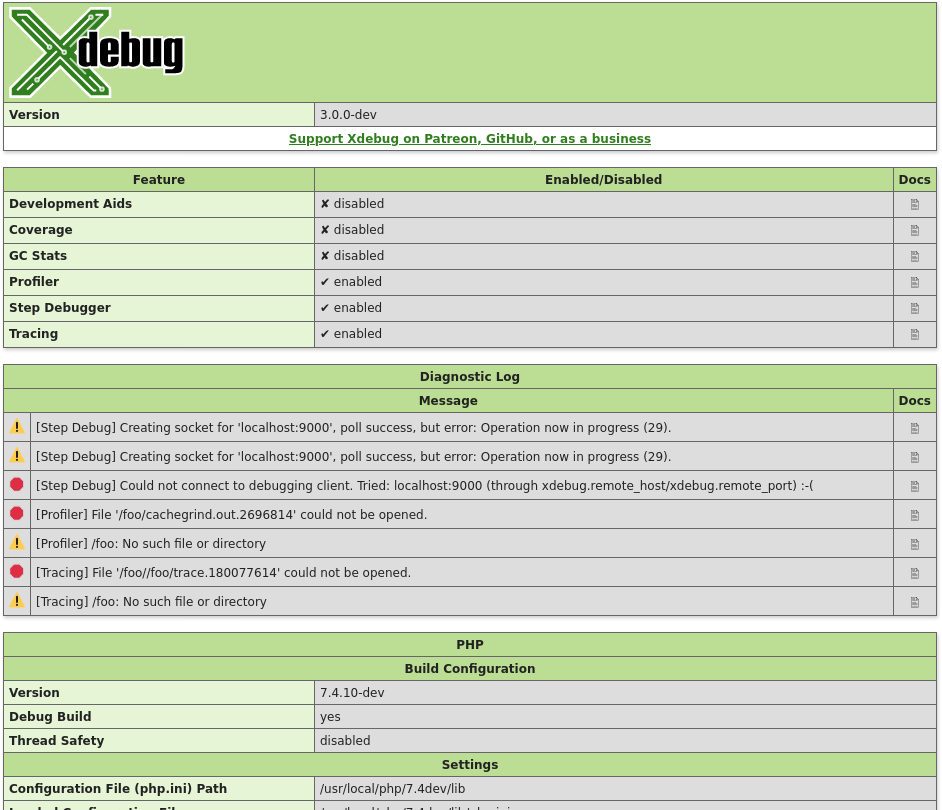
Create a PHP page that calls xdebug_info(). If you request the
page through the browser, it should show you an overview of Xdebug's settings
and log messages.
On the command line, you can also run php -v. Xdebug and its
version number should be present as in:
PHP 7.4.10 (cli) (built: Aug 18 2020 09:37:14) ( NTS DEBUG )
Copyright (c) The PHP Group
Zend Engine v3.4.0, Copyright (c) Zend Technologies
  with Zend OPcache v7.4.10-dev, Copyright (c), by Zend Technologies
  with Xdebug v3.0.0-dev, Copyright (c) 2002-2020, by Derick Rethans
If Xdebug does not show up, or you get a warning from PHP that an
xdebug.so file or similar was not found, you might need to use the
full path instead of just zend_extension=xdebug, such as
zend_extension=/usr/lib/php/20190902/xdebug.so.
On Windows, you should place the php_xdebug.dll in the
ext/ directory, which is a child directory in your PHP
installation tree.
If you have trouble with this, please refer to the installation wizard to help you guide through this
process.
What's Next? #
With Xdebug loaded, you can now enable individual features, such as
Step Debugging, or Profiling. Information on what these features are,
how they work, and how to configure them is available on each feature's
documentation page:
Related Content #
 Activation and Triggers
This video explains how to activate, through triggers and other method's Xdebug's step debugger, profiler, and tracer.
- Xdebug 3: Diagnostics
This video teaches you how to troubleshoot your Xdebug setup. It explains how to find out how Xdebug is configured, which settings have been made, and what it is attempting to do regarding its different features.
- Xdebug 3: Modes
This video introduces Xdebug 3's modes — the new way to configure which parts of Xdebug you have enabled.
Related Settings and Functions #
Settings #
string xdebug.log = #
Configures Xdebug's log file.
Xdebug will log to this file all file creations issues, Step Debugging
connection attempts, failures, and debug communication.
Enable this functionality by setting the value to a absolute path. Make sure
that the system user that PHP runs at (such as www-data if you are
running with Apache) can create and write to the file.
The file is opened in append-mode,
and will therefore not be overwritten by default. There is no concurrency
protection available.
The log file will include any attempt that Xdebug
makes to connect to an IDE:
[2693358] Log opened at 2020-09-02 07:19:09.616195
[2693358] [Step Debug] INFO: Connecting to configured address/port: localhost:9003.
[2693358] [Step Debug] ERR: Could not connect to debugging client. Tried: localhost:9003 (through xdebug.client_host/xdebug.client_port).
[2693358] [Profiler] ERR: File '/foo/cachegrind.out.2693358' could not be opened.
[2693358] [Profiler] WARN: /foo: No such file or directory
[2693358] [Tracing] ERR: File '/foo/trace.1485761369' could not be opened.
[2693358] [Tracing] WARN: /foo: No such file or directory
[2693358] Log closed at 2020-09-02 07:19:09.617510
It includes the opening time (2020-09-02 07:19:09.616195), the
IP/Hostname and port Xdebug is trying to connect to
(localhost:9003), and whether it succeeded (Connected to
client). The number in brackets ([2693358]) is the
Process ID.
It includes:
[2693358]- process ID in brackets
2020-09-02 07:19:09.616195- opening time
-
For Step Debugging:
INFO: Connecting to configured address/port: localhost:9003.
ERR: Could not connect to debugging client. Tried: localhost:9003 (through xdebug.client_host/xdebug.client_port).
For Profiling:
ERR: File '/foo/cachegrind.out.2693358' could not be opened.
WARN: /foo: No such file or directory
For Function Trace and Flame Graphs:
ERR: File '/foo/trace.1485761369' could not be opened.
WARN: /foo: No such file or directory
All warnings and errors are described on the Description of errors page, with
detailed instructions on how to resolve the problem, if possible. All errors are always logged through
PHP's internal logging mechanism (configured with error_log
in php.ini). All warnings and errors also show up in the
diagnostics log that you can view by calling xdebug_info().
Step Debugger Communication
The debugging log can also log the communication between Xdebug and an IDE.
This communication is in XML, and starts with the <init XML
element:
<init
    xmlns="urn:debugger_protocol_v1" xmlns:xdebug="https://xdebug.org/dbgp/xdebug"
    fileuri="file:///home/httpd/www.xdebug.org/html/router.php"
    language="PHP" xdebug:language_version="7.4.11-dev"
    protocol_version="1.0" appid="2693358" idekey="XDEBUG_ECLIPSE">
        <engine version="3.0.0-dev"><![CDATA[Xdebug]]></engine>
        <author><![CDATA[Derick Rethans]]></author>
        <url><![CDATA[https://xdebug.org]]></url>
        <copyright><![CDATA[Copyright (c) 2002-2020 by Derick Rethans]]></copyright>
</init>
The fileuri attribute lists the entry point of your
application, which can be useful to compare to breakpoint_set
commands to see if path mappings are set-up correctly.
Beyond the <init element, you will find the configuration of
features:
<- feature_set -i 4 -n extended_properties -v 1
-> <response
       xmlns="urn:debugger_protocol_v1" xmlns:xdebug="https://xdebug.org/dbgp/xdebug"
       command="feature_set" transaction_id="4" feature="extended_properties" success="1">
   </response>
And continuation commands:
<- step_into -i 9
-> <response
       xmlns="urn:debugger_protocol_v1" xmlns:xdebug="https://xdebug.org/dbgp/xdebug"
       command="step_into" transaction_id="9"
       status="break" reason="ok">
           <xdebug:message filename="file:///home/httpd/www.xdebug.org/html/router.php" lineno="3">
           </xdebug:message>
   </response>
You can read about DBGP - A common debugger protocol specification at its dedicated documation page.
The xdebug.log_level setting controls how much information is
logged.
Many Linux distributions now use systemd, which
implements private tmp directories. This means that when PHP
is run through a web server or as PHP-FPM, the /tmp directory is
prefixed with something akin to:
/tmp/systemd-private-ea3cfa882b4e478993e1994033fc5feb-apache.service-FfWZRg
This setting can additionally be configured through the
XDEBUG_CONFIG
environment variable.
integer xdebug.log_level = 7 #
Configures which logging messages should be added to the log file.
The log file is configured with the xdebug.log setting.
The following levels are supported:
| Level | Name | Example |
|---|
| 0 | Criticals | Errors in the configuration |
| 1 | Errors | Connection errors |
| 3 | Warnings | Connection warnings |
| 5 | Communication | Protocol messages |
| 7 | Information | Information while connecting |
| 10 | Debug | Breakpoint resolving information |
Criticals, errors, and warnings always show up in the
diagnostics log that you can view by calling xdebug_info().
Criticals and errors are additionally logged through
PHP's internal logging mechanism (configured with error_log
in php.ini).
This setting can additionally be configured through the
XDEBUG_CONFIG
environment variable.
string xdebug.mode = develop #
This setting controls which Xdebug features are enabled.
This setting can only be set in php.ini or
files like 99-xdebug.ini that are read when a PHP process starts
(directly, or through php-fpm). You can not set this value in
.htaccess and .user.ini files, which are read
per-request, nor through php_admin_value as used in Apache VHOSTs
and PHP-FPM pools.
The following values are accepted:
off- Nothing is enabled. Xdebug does no work besides checking whether
functionality is enabled. Use this setting if you want close to 0
overhead.
develop- Enables Development Helpers including the overloaded var_dump().
coverage- Enables Code Coverage Analysis to generate code coverage reports, mainly in
combination with
PHPUnit.
debug- Enables Step Debugging. This can be used to step through your code while it
is running, and analyse values of variables.
gcstats- Enables Garbage Collection Statistics to collect statistics about PHP's Garbage
Collection Mechanism.
profile- Enables Profiling, with which you can analyse performance bottlenecks
with tools like KCacheGrind.
trace- Enables the Function Trace and Flame Graphs features.
- The former allows
you record every function call, including arguments, variable assignment, and
return value that is made during a request to a file.
- The latter can be used to visualise certain performance characteristics.
You can enable multiple modes at the same time by comma separating their
identifiers as value to xdebug.mode: xdebug.mode=develop,trace.
XDEBUG_MODE environment variable
You can also set Xdebug's mode by setting the XDEBUG_MODE
environment variable on the command-line; this will take precedence over the
xdebug.mode setting, but will not change the value of the xdebug.mode
setting.
Some web servers have a configuration option to
prevent environment variables from being propagated to PHP and Xdebug.
For example, PHP-FPM has a clear_env
configuration setting that is on by default, which you will
need to turn off if you want to use XDEBUG_MODE.
Make sure that your web server does not clean the environment, or specifically
allows the XDEBUG_MODE environment variable to be passed on.
Functions #
xdebug_info( string $category = null )
: mixed
#
Show and retrieve diagnostic information
This function presents APIs to retrieve information about Xdebug itself. Which
information gets returned, or displayed, depends on which arguments, or none at
all, are given.
$category =
Without arguments, this function returns an HTML page which shows diagnostic
information. It is analogous to PHP's phpinfo() function.
The HTML output includes which mode is active, what the settings are, and
diagnostic information in case there are problems with debugging connections,
opening of files, etc.
Each warning and error in the diagnostics log also links through to the
Description of errors documentation page.
$category = 'mode' (New in Xdebug 3.1)
The function returns an array of all the
enabled modes, whether through xdebug.mode or the
XDEBUG_MODE environment variable.
Example:
<?php
var_dump( xdebug_info( 'mode' ) );
?>
Returns:
array(3) {
  [0] =>
  string(5) "debug"
  [1] =>
  string(7) "develop"
  [2] =>
  string(5) "trace"
}
$category = 'extension-flags' (New in Xdebug 3.1)
The function returns an array of all the compile flags that were enabled when
running ./configure as part of Xdebug's compilation process, and
all the system-specific detected features that effect Xdebug's behaviour.
If the compression flag is enabled, then the xdebug.use_compression
setting is available, and enabled by default.
Profiling and Function Trace will create GZip compressed files if the
xdebug.use_compression setting is turned on (the default).
If the control-socket and tsc elements are present,
then Xdebug can be controlled with the Xdebug Control tool, as long as
xdebug.control_socket is not set to "off".
If the control-socket flag is present, but the tsc
flag is not present, then you must set xdebug.control_socket to
"time" deliberately for Xdebug Control to be able to interact
with Xdebug.
Example:
<?php
var_dump( xdebug_info( 'extension-flags' ) );
?>
Returns:
array(1) {
  [0] =>
  string(11) "compression"
  [1] =>
  string(14) "control-socket"
  [2] =>
  string(3) "tsc"
}